Showing posts with label calculator. Show all posts

16 August 2026

I SEE A KEY ON THE GROUND [549]


“If you’re not using your phone, put it in your pocket,” is what I should have told myself, as I left the building, tipping through the exit, and launching my device in an overarm throw into the car park. The protective glass I put over the screen wasn’t going to help anything, as the face landed face down. 


A freak accident caused by not thinking in the moment smashed the screen of my phone, and my reliance on the device meant I could only see the cracks, the black mirror reflecting someone declaring themselves unlucky in the moment. My only fortune is that only the surface cracked, the screen itself remaining functional – I could still use it to catch the bus, and sign into programs at work – but green and purple lines would make themselves known, perhaps exacerbated by taking the phone out of my pocket and putting it back.


I would book a repair of my phone on the day of the incident, but that was set for Saturday – it was still Tuesday. On Wednesday, as the first few lines appeared, I realised I would need to cradle my device in my hands as I walked, the exact opposite of what I should be doing in order to prevent any further damage, because who would ever keep a spare smartphone at home for situations like this? This keeping myself aware of my phone’s new-found fragility also bled through to the preparations for its repair. 


In short, if you do not have a plan for backing up your data, find one, and find it now. I was faced with the advice to complete a backup, because the diagnostic processes to be run on my phone may result in data loss, and following multiple transfers of data from one phone to another over the years, a sidestep had never been needed before now. Perhaps that was one level of trust too far in the range of phones I prefer.


With my phone made by the manufacturer of my desktop computer, it would be very easy to back one up to the other – as well as their making stronger phones that have bouncier screens – but when they both have the same 256 GB storage capacity, that option is rendered impossible. I ultimately had to move some items to other devices, like thousands of unsorted photographs and screenshots that I will get to eventually, while paying for cloud storage to hold vital items like phone messages and contacts, and ultimately delete episodes of podcasts that were saved, deciding that they can be downloaded again if I need them later – they won’t become “lost media” if I don’t have direct access to them for a while.


Fortunately, the replacement of my screen, while costly, was performed without my hitch, and no data was lot. The manufacturer must warn of data loss because they are ultimately not responsible for your data, the same way that manuals for calculators contain disclaimers confirming they are not responsible for the answers generated by their machines. The user must know their answer has been calculated correctly, and the user must look after their data – I have just realised that may apply to the cloud storage as well.


In all, I spent under two hours without my phone, an experience that cannot now generate that level of anxiety again, through having been experienced once. Losing your phone is now like losing your keys, because that is the level of security and importance now expected by this Swiss army knife of devices, a level of convergence that risks becoming unhelpful. It may now be more useful to spread some use requirements across separate devices – your keys cannot be your camera, or your watch, or your calculator. Your clothes may need bigger pockets in future.

16 June 2024

I’M COUNTING ON YOU, DEAR [453]

Apple's macOS 14 calculator

With Apple’s grafting of artificial intelligence onto the next updates of their devices’ operating systems, I found it hilarious that the addition of a calculator app to the iPad received so much anticipation. 

“Apple Intelligence” will only be available on certain devices with the necessary processors and RAM to undertake tasks inside the device - my iPhone 14 Pro, bought in late 2022, is not set up for it, but it does have a built-in calculator.

My owning many purpose-built calculators, filled with tangible, clicking buttons, has made Apple’s calculator app an afterthought for me for years, whether its face was inspired by the design philosophy of Braun and Dieter Rams or not. Turning your phone sideways to access scientific functions requires me to unlock the screen’s “portrait orientation” first, and when I do, there are no time calculation functions available. Screenshots of the replacement app appear to change the orientation issue at the very least. The calculation app I do use is Free42, recreating the advanced Hewlett-Packard HP42S, letting me use Reverse Polish Notation (RPN) as well.

Apple has a perfectly capable calculator app, available on its desktop and laptop computers, and it appears to be this which has formed the base of the new calculator for iOS and iPad OS. My reason for thinking this is recall of previous calculations, known under the skeuomorphic name of “Paper Tape” on macOS, and the addition of unit conversions, locating time functions there, and including currency conversions using data provided by Yahoo – I have never used this, as while this conversion rate may be of use to people working in finance, more useful to many more would be tourist rates, or even the rates that PayPal are currently using.

“Math Notes” is the major innovation on the new calculator app, supporting the handwriting of calculations and equations, which the app will then immediately solve, and re-solve if variables are changed – this was used by Apple as a further selling point for Apple Pencil, but using a finger will suffice. 

This feature feels like the endpoint of the various school calculator input methods like Sharp’s DAL (Direct Algebraic Logic) and Casio’s VPAM (Visually Perfect Algebraic Method) and Natural Textbook Display, all touted as innovations that help you input calculations like they are listed on the page. I have never got on with these, partly because this was not how I was taught maths at A-Level, which was to use the calculator to answer pieces of an equation, but use paper for the rest, and so I have always believed that just copying up the problem won’t help you understand it – you use these if you only need the answer, not an explanation of how you got there. At least Casio’s new scientific calculators rearranged themselves to make them more enticing to explore, something not required of Apple’s app.

Will I use the new app when my phone is updated? Probably not – while it is currently in beta mode, to be released later in 2024, I do not see the RPN option I use on Free42. With other apps having for years met the needs that Apple had not supplied with their own app, more features and customisation is required to match those offerings – either that, or add Math Notes to the desktop app, and put that on my phone.

23 September 2023

DON'T COUNT ME OUT [415]


No matter how informed you made yourself before talking about an item, that is still no substitution for using that item, and I am guilty of that here.

After writing about Casio’s new ClassWiz series of calculators, and having decided it was not for me, I wound up buying one anyway. This opportunity came because of surplus stock of the top-of-the-line Casio fx-991CW after a supermarket’s “Back to School” sale, its £30 price having been halved, and then halved again. I bought one of the last few for £7.50 in vouchers, concluding that I got a free calculator for being a loyal customer.

Having read the instructions online before buying the ClassWiz worked out in my favour, as you no longer get a full instruction book in the packaging - only a quick start guide and warranty card is included. However, the initial gripe of having to select “Calculate” upon turning the device on, to complete a simple calculation, is eliminated once you realise that, if you turn off the calculator while in that “app”, or in the Statistics, Spreadsheet, Equation or any other mode, it will still be in that mode once you turn it on again.

I realised the arrangement of keys is more intuitive for the way we use devices now. The “Home”, “Back” and “Settings” buttons, and their respective house, arrow and levels icons, are universally recognised, and coupling these with the higher-resolution screen, now supporting one level of grey for contrast, means every available option is clear. I’m surprised they didn’t use the screen to build a “Help” or “Instructions” app into the device itself, unless that is somehow counted as cheating at school.

The “Catalog” button, housing many of the options previously requiring the shift key on the main keyboard, will become easier to use in time, once you know how far down some options are – I have realised that “%”, usually its own button on even the cheapest and simplest of calculators, is now found under the Catalog’s “Probability” list. Its focus is to provide all the mathematical symbols likely to be used in maths or science lessons, as you can enter equations as seen in textbooks using all the correct symbols, meaning it is clearer why the curly “x” symbol has its own key rather than “%”. However, I will most likely use it for the very comprehensive list of unit conversions.

I admit that I like the idea of the “Math Box” app. I have been known to flip a coin to choose subject matter for a week’s article or, as a writing exercise, thrown dice to determine how many words I should write. I now can simulate tossing up to three coins, or rolling up to three six-sided dice, as many as 250 times, then produce a table of how often each result came up, if I am so inclined. I don’t know why these features aren’t in the “Probability” section of the Catalog, alongside the feature for producing random numbers, unless Casio wanted a prominent place for two ways of solving arguments.

In short, I have learned my lesson. I like calculators, I like devices with a lot of buttons on them, and I like exploring devices with a lot of buttons on them. If those buttons are arranged differently, then I am going to explore more, and I should have realised that before getting my hands on one. With the UK government currently planning to make maths compulsory in schools to A-Level, the new ClassWiz calculator, while not what I have been used to seeing, will help the reticent student that may not otherwise have wanted to study maths by being as clear and approachable as possible, and that is nothing but a good thing.

20 August 2023

BY PRESSING DOWN A SPECIAL KEY [410]


Back in 2019, at the end of my video about calculators, I recommended the Casio fx-991EX ClassWiz, a scientific calculator for students, as the best, most comprehensive and easy to use calculator you can buy. In 2023, I think it remains the best choice, because its replacement is not as friendly to use. Casio are also seemingly the only company still selling calculators in regular stores in the UK, making anything else harder to recommend to the average user.

The new Casio ClassWiz range, topped by the fx-991CW, makes more use of menus and phone-line apps to group together statistical, distribution, equation and matrix calculations, among others, that previously were accessed via a “shift” function on the main keyboard. This may prove useful in a teacher setting, but it does away with a layout that Casio has built on since its first pocket scientific calculator, the fx-10 of 1974, and has become intuitive through its use by generations of people, from children through to adult. 

However, the new Casio ClassWiz range won an iF Design Award in 2023 because, according to the iF International Forum Design’s website, it “is designed to make math[s] fun and accessible again amid an accelerating decline in mathematics students worldwide who equate math[s] with difficulty.” It also says the new user interface encourages curiosity and interest in students, making the calculator more than “a machine students ‘have to use’”.

This has the unfortunate side effect of having to select the “Calculate” option in order to enter 2 + 2 = 4. This situation is more common on graphing calculators, which are half-way to becoming computers, but not on something you can still buy for under £20 at a supermarket.

I have never thought that calculators were getting in the way of learning mathematics – a couple of teachers made it a turn-off at school, but others balanced them out. Gaining confidence with numbers was my reason for continuing the subject through to A-Level, and calculators were there as a useful tool to support the teaching. It was only later I found myself appreciating and collecting calculators for their design, and for how different scientific calculators arranged their functions for people to use.

I use time calculations at work, and the ClassWiz manual confirms this requires more key pressing, with the function used to separate degrees/hours, minutes and seconds, and marked as °’”, now requiring you to press the “Shift” and “+” buttons to access, having previously been its own button.

The previous ClassWiz calculators incorporated use of “apps” in their menus without requiring menu diving to access functions, never having had to do so before doesn’t mean imposing such a system will become easier. It is worth noting that Hewlett-Packard reworked their 32S calculator in 1991, three years after its release, to unpack its menus onto a comparatively more cluttered keypad, but that version continued to sell for another eleven years.

It is not known if Casio have stopped selling the fx-991EX ClassWiz in favour of the new CW version, but they still sell many calculators using the old layout, and other names like Sharp, Texas Instruments and HP still exist, so if you are buying a calculator for your child, make sure you know what features they need to include, and make sure they read the instructions.

27 February 2022

DON’T KNOW WHAT A SLIDE RULE IS FOR [333]


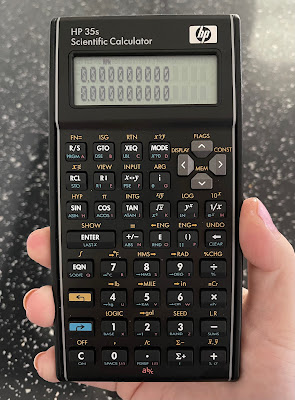
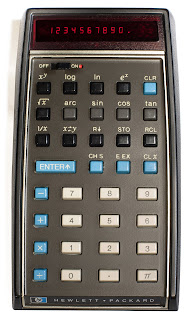
The year 2022 marks fifty years since the introduction of the first pocket scientific calculator, the Hewlett-Packard HP-35. Despite this, I have not seen any evidence that this anniversary is going to be marked in any way, especially as the calculator HP introduced to mark the 35th anniversary in 2007 remains in production to this day, without any changes or updates having been made. The HP 35s could well be the final statement on the matter, as if nothing further can be done.

Having said that, the HP 35s is my favourite calculator to use – I originally said this about the HP-12C financial calculator, in my video about it in 2019 [link], but I hadn’t got my hands on an HP 35s yet. Like the original HP-35, it is ostensibly an engineer’s calculator, including all the expected trigonometric and statistical functions, plus logic and conversions of numerical bases and unit measurements. It is also programmable for any equations you need to need to use frequently, using an intuitive basic language. It is the most you can get a “standard” scientific calculator to do before expecting it to draw a graph and connect to your computer. For me, the HP 35s is solid and dependable, its bowed sides alluding to the original HP design made to fit your pocket more easily, and the keys have a very satisfying click, making it a good stress reliever.


Like the HP-12C, the 35s can use Reverse Polish Notation (RPN) for number entry, which is most easily summarised as entering the number first, then saying what you want to do with it: while you would enter 1 + 2 + 3 = on a standard calculator to get the answer 6, an RPN calculator requires you to type 1 ENTER 2 + 3 +, with no equals button required. More crucially, HP’s RPN calculators use a four-level stack of numbers when calculating, allowing you to combine answers to different calculations more easily using fewer keystrokes – there are also dedicated keys for changing the order of numbers in the stack, depending on what you need. The standard display always shows the first two numbers in the stack, making it much easier to picture everything in order. I found myself becoming so used to this when working from home that I had to buy a second HP 35s for when I returned to the office.


I think this is enough cause for a celebration, but I collect calculators, so of course I would say that. What I think means we may not have this is that HP is not the same company it was in 2007: it had already spun off its analytical instrument arm, including the oscilloscope manufacture on which the company was founded, as Agilent in 1999, and it separated its consumer computer business from its enterprise products and services in 2015. With Hewlett Packard Enterprise also taking the names of the company’s founders with it, the “HP” logo on computers and calculators no longer legally stands for anything, other than the history it used to have. With calculators being HP’s first ever product for the consumer market, it is now listed as “accessories” on the consumer HP’s website, rather than having been hived off with Agilent.


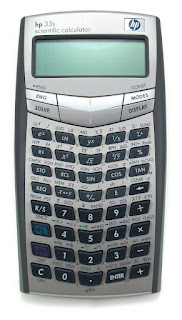
Even then, I am not sure how much involvement HP has with its calculators – their range has been made for them by the Taiwanese company Kinpo Electronics since about 2003, which is also true for Casio and Canon calculators. Up to then, HP’s range had used one standard design, from the cheapest 10B business model to the most advanced 42S scientific calculator, but this was swept aside for an array of bewildering designs for each one: the 35s’s predecessor, the 33s, pushed its keys into a V formation that, to me, is difficult to look at, so a return to the more traditional look based in the 1970s was actually beneficial – another business calculator, the 17bII+ (denoting the second version of an earlier calculator, with more features added), was redesigned to match.


Having heard no announcements or developments so far, it would be a shame not to mark this anniversary in some way. Even if calculator use outside of schools and exams have been replaced by phones and spreadsheets, the initial explosion in their manufacture and use in the 1970s led manufacturers to move to home computers, digital watches and synthesisers. I wouldn’t want this article to be the only acknowledgement of that.

29 August 2021

BUT I DO KNOW ONE AND ONE IS TWO [308]


There seems little point in posing a maths question if the intention is to trip someone up, especially if you create doubt over whether a right answer is possible. 

I had previously seen the following example spread widely in 2019, and it has reappeared many times since: 8 ÷ 2(2x2) = ?


But this one has also appeared: 5 + 6 x 4 = ?


There is one very clear reason why the answer to the first question is 1, but this same reason is why the answer to the second could be either 44 or 29.


BODMAS has been taught in British schools since the 1920s, prescribing how you should solve maths problems: Brackets, Orders, Divide, Multiply, Addition, Subtraction. Known as PEDMAS in the United States because of the alternative use of parentheses and exponents as mathematical terms, these abbreviations were created in the hope of becoming acronyms ingrained in the heads of schoolchildren – I think they eventually got there.


When I originally saw 8 ÷ 2(2x2), I knew the answer could only be 1, because brackets were used: 8 ÷ 2(2x2) = 8 ÷ 2(4) = 8 ÷ 8 = 1.


However, 5 + 6 x 4 could be answered linearly or using BODMAS, creating two different answers:


Linear: 5 + 6 x 4 = 11 x 4 = 44


BODMAS: 5 + 6 x 4 = 5 + 24 = 29


This is usually the end of it, but I realised it was never really explained at school why this rule even exists, and it is down to how much each mathematical operator changes the eventual answer. Multiplication and division are simply adding or subtracting one number many times, so it would make sense to act upon those first, but you should always simplify by answering brackets first – writing 5 + 6 x 4 as 5 + (6 x 4) also makes clearer what is meant to be happening. 


Left to right: Casio SL-310UC, Canon LC-83M, HP 35s


However, while BODMAS confirms that multiplication should be done before addition, dividing does not need to be done before multiplying, or subtraction before addition, so trying to create an acronym creates a misnomer as well. Calculators that implement BODMAS are programmed to multiply or divide, whichever comes first in the equation, followed by adding or subtracting, again whichever comes first.


But you can even get a different answer based on the calculator you use. I tried this with a Casio SL-310UC, a basic calculator, and the answer produced was 44, because it calculated each segment of the question as you go: pressing the multiply button after entering 6 produced the answer “11” on screen, before entering 4 and pressing the equals button. 


Meanwhile, the Canon LC-83M, a 1980s slide rule calculator, only produces an answer when you press the equals button, down to the “Algebraic Operating System” displayed on the case. BODMAS is built into the calculator, guaranteeing the answer of 29 in this case.


To make things extra complicated, the HP 35s, a sophisticated programming scientific calculator, can produce both answers. In Reverse Polish Notation, you enter your numbers first, then enter what you want to do with them, building numbers in a stack – this relies upon the user to remember BODMAS to multiply the 6 and 4 first, instead of starting with the 5 and adding the 6. Changing the HP 35s to the standard Algebraic function used by the other two calculators, BODMAS now automatically applies, producing the answer 29.


With calculators now mostly bought for use in schools, adherence to BODMAS is expected, along with the ability to enter equations exactly as they appear on the page. Knowing what you are entering is more important than knowing how the calculator processes it – most instruction manuals therefore add a disclaimer confirming the manufacturer does not take responsibility for any answer generated.

29 May 2021

FIVE YEARS, STUCK ON MY EYES [300]

First logo (May-December 2016)

Hello there. There is a question you often hear in interviews where the answer is always going to be “no.” “Did you think that when you started Leigh Spence is Dancing with the Gatekeepers on 30
th May 2016, that you would still be doing it five years later?” “Yes, yes I did, I always knew that I could write articles about various aspects of popular culture, philosophy and the news, then deliver them weekly for that that entire time without a break. That outcome was baked in from the start.”

Of course, I never planned it, but I’m glad it happened. I began this site to keep my mind working, learn more about different subjects, and build confidence in putting my name out there. I was inspired by the Three Minute Thesis competition, begun by the University of Queensland, which challenges PhD students to present their research in only three minutes, to an audience with no specialty in their subject. Trying to explain a complex subject in an engaging manner is a brilliant way to develop your communication skills, so I deliberately put myself in a position to make myself do this over and over again, refining my approach and style as I go. I originally set myself a five-hundred-word limit, which would take about three minutes to read, and if anyone else happened to read what I wrote, then that was good – and if they found it entertaining, better still.


I certainly did not expect to arrive here, at my three hundredth article, having reached over 196,000 views so far, with another sixteen thousand for the “Gatekeepers” videos posted to YouTube. I can only assume that my plan must be working, especially as that word limit was abandoned a long time ago! To anyone that has read or watched my work over the last five years, thank you for your time.


The question is, what have I learned in that time? What lessons from five years of nostalgia culture crisis will I take into the next five, provided I get that far?


Second logo (January 2017 to May 2017)


1. STAY CURIOUS

I am happy I have never restricted my choice of subjects. I may like to find out new things, especially about how ideas, machines and personalities are constructed, but there is a difference between a hobby, and your natural state of being. I cannot imagine a version of me that is simply contented with things being as they are – I would want to know why that was the case.


Therefore, my top ten most read and viewed works here, combining views on my website and YouTube, is as varied a list as I could have hoped for, and I am happy with what has appeared. Some weeks may feel like I’m throwing spaghetti against a wall to find a subject, but it is amazing to see what sticks.


1. Why BBC Radio had no news to broadcast on Good Friday 1930 (#88 I’m Just Second Hand News, written version posted 29/12/2017, video 24/02/2020)


2. My January 2020 walk around the doomed Elephant & Castle Shopping Centre (#217 An Elephant Never Forgets, video posted 15/01/2020)


3. The shipwrecked ocean liner SS American Star, formerly America and Australis (#76 Just a Dream and the Wind to Carry Me, written version posted 06/10/2017, video 26/12/2019)


4. Looking around The Bridge Shopping Centre, Portsmouth in 2019 (I’m Giving Up on Trying to Sell You Things That You Ain’t Buying, video posted 13/10/2019) 


5. How “CheapShow” is the “Goon Show” of podcasts (#234 Welcome to the Cheap Seats, posted 03/05/2020)


6. A list of interesting facts about Jeremy Beadle, who built a library onto his house (#26 Watch Out, Beadle’s About, posted 11/11/2016)


7. The HP-12C financial calculator, which no-one has stopped buying since 1981 (#200, I Am Adding and Subtracting, I’m Controlling and Composing, video posted 29/09/2019)


8. the battle to grow blue roses (#78 I’ll Pick a Rose for My Rose, written article posted 20/10/2017, video 25/05/2020)


9. The ornate pleasure dome that is The Trafford Centre, Manchester (#192, Plastic Palace People Sing Silent Songs, written version posted 11/08/2019, video 22/03/2020)


10. The ridiculous Sports Direct Giant Calculator (#208 Everyone Seems to Know the Score, video posted 24/11/2019)


Is there anything I wish was on the list? Not really, as writing about a particular subject never means I am then done with it. However, if you read what I am calling “The Myra Breckinridge Trilogy” - #149 Come Outside (Shove It) (03/02/2019), #150 I Wouldn’t Tell You Where to Go (10/02/2019), #204 Mama I’m Sure Hard to Handle (27/10/2019) – suggests I am not done with that film yet.


Third logo (May 2017 to April 2018)

2. ALL THEY HAVE ARE WORDS

In hindsight, I find it funny that I started this series by picking apart why The Beatles are called “The Beatles,” but it set the tone I wanted. The intention was to point out that, while the true inspiration came from Buddy Holly and the Crickets, and the name of Marlon Brando’s motorcycle gang in the 1953 film “The Wild One,” the “official” origin is instead a man coming to John Lennon in a dream, riding a flaming pie, declaring the name of his band will be “The Beatles” with an “a.” It turned out that Yoko Ono pushed for this version, a flippant answer once given by Lennon to a journalist, to be the origin of the band’s name as given in “The Beatles Anthology,” with Sir Paul McCartney admitting, “There are still a lot of things we have to fudge because of compromise. If we don't all agree on a story, somebody has to give in.”


Well, I dreamt that I had recorded an album titled “Leigh Spence is Dancing with the Gatekeepers,” and one song on this album will feature me repeatedly singing “all we have are words” – I’m guessing I was incandescent, either in the dream or earlier that day, about being told what to think, by someone who claimed they had all the answers. I will write that song eventually, but after having to reject any comparison I could have made with The Beatles’ flaming pie, I concluded that “Gatekeepers,” as a series, will “be more about me trying to make sense of an issue, why I think the way I do, or why I am expected to think something, rather than coming to a decision. Ultimately, I want this to be a fun exploration of the stories we tell ourselves.” Keeping this in mind would, hopefully, prevent me from being seen as a “gatekeeper” myself.


So, the angle and tone for my writing was set by The Beatles. It was at this point I decided to use song lyrics as titles for my work, as a kind of primitive search engine optimisation, although that first title came from David Bowie’s “Word on a Wing”: “Ready to Shape the Scheme of Things.”


I did talk again about The Beatles, except to explore how multi-track recording meant John Lennon didn’t have to play his harmonica anymore.


Fourth logo (April 2018 to May 2021)


3. ALL THEY HAVE ARE WORDS


When I began “Gatekeepers,” Barack Obama was still President of the United States, David Cameron was still Prime Minister, the Brexit vote was a few weeks away, and Donald Trump was an also-ran… and then, 51.9% of 72.2% of the British electorate voted to leave the European Union. I don’t give the figures like that to question the legitimacy of the vote, more to point out that the single issue that has dominated British politics, and social life, ever since, was decided in a process where over a quarter of people who were entitled to have their say said nothing at all. I personally believe voting in elections and referendums should be mandatory, so the winner knows they have to answer to their entire electorate.


I consider my political position to be slightly left of the middle – many would consider me to the “right” of them, and many more would consider me to be the “left” of them. As a result, I have never found talking about the “Right” and the “Left” to be overly helpful. The last five years pushed politics and people to extremes of opinion and thought, whether that be Labour and Conservative, or Democrat and Republican, and I am left in the middle thinking, “what happened?” 


I never feel I need to talk about my own politics, but I feel I have become more informed about what mine is. I just wished that politics could become the background to general life again, instead of carrying the tune.


4. ALL THEY HAVE ARE WORDS

I began 2021 by writing several articles about how postmodernism, a branch of arts and philosophy deeply rooted in the 1980s and 1990s, still influences public discourse today. Most notably, the route normally taken is to think that, just because Jacques Derrida deconstructed texts to look at meaning and motive, reality itself must therefore be relative, and you can do and say anything you want. Even worse, deciding you can say what you want, because you know it ultimately doesn’t matter, is dangerous. 


No wonder I spent four out of the last five years excoriating Donald Trump. Originally just someone who needed people to explain what he is trying to say, the alternate reality Trump’s words created became so dangerous to the security of his own country that he had to be banned from Twitter. Now a relic of his own era, Trump had to start a website to continue issuing his own statements – anyone can do that (I said, living in a country where a right-wing newspaper columnist became Prime Minister). 


Imagine putting ideology over life. Imagine being so strident with your language that it killed people.


Fifth logo (from May 2021)
 

5. ALL I HAVE IS WORDS


Words can only take you so far. That is why I started making videos as well. 


When making a trailer for my YouTube channel I ended it by saying, as a joke, “That’s Leigh Spence is Dancing with the Gatekeepers, the longest name in culture.” The truth is, if I knew this would turn into an ongoing project, I would have chosen a shorter name, no matter how evocative “Dancing with the Gatekeepers” is – I once had to tell someone, “It’s not an affirmation, it’s a website.”


Therefore, I am changing things a bit. The new name for this series is “Leigh Spence,” subtitled “dancing with the gatekeepers since 2016” – there will still be “nostalgia culture crisis” in the mix, but that can be taken as read by. The new address for all my work will be www.leighspence.net.


I also have a degree in film studies, but YouTube opened the year after I graduated - I wish I had been in on the ground floor of that in 2005, but streaming video never mixed well with dial-up internet. Now that I can fit a video camera approaching TV broadcast quality into my pocket, allowing me to use it like I would a pen, there is simply no excuse to take the leap I need… said someone who made a video questioning if videos need pictures, and presented my thoughts on Ikea plastic plants in 2.39:1 Cinemascope.


From now, video will be my focus. I will still post my scripts to read, but they will have been made as videos first. Separate written articles will still appear on occasion.


What has cemented this decision is that top ten list. Three of the “articles” were made as videos first, and my walk around the Elephant & Castle Shopping Centre, a fifteen-minute video with no voiceover, constructed entirely through editing pictures and captions, is exactly what I should pursue more. That this video is also the second most-viewed “article” of the series makes that decision extremely easy.


For this reason, I may not post something new every week – you tend not to be in pre- or post-production on a written article. I also need to work around a full-time job until something causes that to change, like a lottery win. However, more time will produce, I hope, even better work.


In short, I owe the confidence I have to the work I have done, and I am the person I am due to that confidence.


After five years, and three hundred articles… I think I’ll give myself the week off.

24 November 2019

EVERYONE SEEMS TO KNOW THE SCORE [208]


Please see below for the script I used:


Hello there. It shouldn’t need this much effort, but even a gigantic piece of technology can still tell me that two plus two is four.

So, this is the Sports Direct giant calculator. For those outside the UK, Sports Direct is a sporting goods and fashion retailer, towards the cheaper end of the market, but they are also the owners of sporting labels like Slazenger, Everlast and Lonsdale. They are also in the business of selling giant novelty items with their logo plastered on them, like mugs, bowls, and calculators. It cost me all of four pounds to buy, and the cashier smiled when I asked for one – they were on a peg behind her, so I couldn’t just reach over and take one. You can buy similar calculators without the logo, but it’s one more thing with “Sports Direct” on it, and that’s why it exists. Nothing else about this says “sport,” does it?

Despite the size this is still a calculator, working like any other... to a point. You’ll notice that there are no memory functions, but that isn’t unusual. I have an old Sharp calculator, made in 1974, that doesn’t have them either. If you really needed it, you could always just write the number down. However, one thing isn’t quite right. You can usually enter more numbers than the screen can handle, but still add, subtract, multiply or divide the number on screen. On the Sports Direct giant calculator, if you enter too many numbers, an error message happens, and you can’t do anything more. You have to reset, and start again. Remember, no more than twelve digits, and you’ll be fine.

The packaging says the calculator is designed for people with a visual impairment. Nice try. More seriously-minded solutions use braille, or an electronic voice to read the display, while most smartphones can use voice activation without using a single button. Larger machines include teaching aids made for overhead projectors, to display a calculator on a wall, and while you can buy giant scientific calculators that can display graphs, the price may give you pause.

What surprised me most about this is its build quality. How does something that only cost four pounds need twenty screws? An A4-sized calculator can’t need the circuit board the size of a PC motherboard? Trust me for owning a screwdriver.

(While I do that, I should mention that, if you are selling an old calculator on eBay, it’s all fine saying it comes from a smoke-free home, but please also say if you are a smoke-filled home. I opened up this old Canon calculator to clean it, and the circuit board stank! Was someone smoking through it or something?)

(Just to say, I’ve nearly finished.)

(Oh, sorry.)

I was not expecting a piece of cardboard but, taking it out, you can see how it shields the contacts, which are printed onto a piece of paper. These connect up to a tiny central circuit board, to which the screen, battery and solar panel are attached. There are more elegant versions of this – this Casio fx-100d, for example, attaches its single chip to a piece of plastic, and that’s pretty much it. On the other hand, it also does a few more things.

Thank you for watching. As ever, the nostalgia culture crisis continues at [www.leighspence.net], and I shall now screw this back together.

28 September 2017

YOU KNOW MY NAME, LOOK UP THE NUMBER [75]


As someone who has owned a scientific calculator since school, I am very aware on how I don’t need to use most of what one can do any more – in fact, the simpler sums I need could often be done by my phone’s calculator app instead. However, the vestigial memories of trigonometry and matrices still in my mind from my Maths A-Level mean the need may come back, so I may as well be ready.
The scientific calculator was invented by Hewlett-Packard in 1968, with the HP9100A, a cash register-sized machine with a TV screen, no integrated circuits, and a five thousand-dollar price tag. Four years later, the HP-35 was designed to co-founder Bill Hewlett’s brief to fit the 9100A into his shirt pocket, becoming the first scientific calculator as we know it. In 1976, a later pocket model, the HP-65, became the first such calculator in space, in case the guidance computer on the Apollo-Soyuz Test Project failed (it didn’t).

With more programming ability than most will ever need, exploring the functions of a scientific calculator can produce some interesting results. On my model, I can move between decimal numerals (your usual 0-9, also known as base 10) and other counting systems. For example, 666, becomes 29A in hexadecimal (0-9 then A-F, base 16), and 1232 in octal (0-7, base 8) – therefore, we have the Number of the Beast, the House Number of the Beast, and the PIN Number of the Beast.

However, the most interesting function there is on my calculator, and the one that produces many of the numbers we are asked to observe in everyday life, is “log,” for logarithm. In the simplest terms, logarithms are used to make long numbers easier to handle, by creating a relationship between an exponent number, and the number that exponent needs to be to raise the power of a base number to the value you want. You can make one thousand by multiplying ten together three times (10 x 10 x 10 = 103= 1000). Taking 10 at its base, the logarithm of 10 is 3, because you needed to raise 10 three times (log10 1000 = 3) - likewise, the logarithm for one million would be 6, and 26 would be about 1.415. Using the “log” button on your calculator assumes base 10, the “common algorithm,” but base e (2.71828…), a pi-like constant in mathematics, is also used, denoted by the “ln” key on your calculator.


Logarithms are used to calculate earthquake magnitude scales, the pH scale to measure the acidity or basicity of water-based solutions, f-stops for camera shutter speeds, population growth, radioactive decay, carbon dating, and decibels for measuring the intensity of sound. In these examples, the figures on the scales presented to us in news stories, on water bottles and on cameras are easily explainable scales, created from exponentially growing numbers of abstract measurements – hydrogen ions per litre of water, ratios of focal length to a camera’s entrance pupil, and so on, situations where you just need a headline number to say, “oh, it’s that bit more.”

However, the headline figure should always be the starting point for your understanding. You don’t necessarily need to know that a magnitude 2.0 hurricane is thirty-two times more powerful than one of magnitude 1.0, multiplying by that amount with each full number, but knowing this brings clarity to the pictures of destruction that accompany the figures. The same can also be applied to interest rates on bank accounts and credit cards, and other figures that may feel abstract, encouraging an easier relationship with numbers.

That was always the intention with logarithms – they inspired the invention of slide rules, using a mechanical slider on a printed scale to make rapid multiplications and divisions, square roots, logarithms and more. However, the ability to enter the numbers you need would wipe out slide rules entirely, like when Bill Hewlett wanted the HP9100A shrunk into his shirt pocket…