Showing posts with label Microsoft. Show all posts

12 December 2021

I CAN’T COMPETE WITH THE RIDERS IN THE OTHER HEATS [323]


You might be surprised that people continue to use Microsoft Internet Explorer but, these days, there are people that will never have used it. Since I registered www.leighspence.net, Internet Explorer accounts for only 1.3% of all access to this site so far – two thirds of access was made by Safari for iOS and iPadOS, distantly followed by Google Chrome, Mozilla’s Firefox and the desktop version of Safari. Hardly anyone used Opera to access this site, despite it now being used on more desktop computers than Internet Explorer, which held a 95% share of all desktop computer web browsing in 2003.

I have only just found out that Microsoft is finally withdrawing Internet Explorer on 15th June 2022 – people who upgraded to Windows 11 have already found it has disappeared, and it will not work if a re-download is attempted, but considering the last major update to the browser was made in 2013, you are only looking to continue using it if you need it. Microsoft’s other browser, Edge, retains an “Internet Explorer” mode so people can continue to access older systems, in some cases the server access sites they need to continue working from home. My moving from PC to Mac means that compatibility issues are both expected, and accounted for – if I work from home, signing into one web page starts a program that will bridge any gaps between my computer and the server at work – but forcing progress on PCs has been slow.


The “Internet Explorer” mode on Edge was meant to have been provided from 2015, when Windows 10 and Edge first appeared, before it was decided to push the browser as the new one that people should be using, despite the untidy situation created of supplying an operating system with two web browsers. What causes the difference is the browser engine used, which renders the HTML code used by the browser into a viewable page: Internet Explorer used its own proprietary engine, MSHTML, while Edge, which originally also used its own engine, now uses an open-source engine also used by Google Chrome, Opera, Amazon and Samsung. Decisions on which engine to use determine how the internet develops, as proved when Apple announced they would not support the Flash plug-in on its browsers in 2011, forcing developers to use alternatives for web graphics.


I know I can download any browser I want, but I use Safari on my phone and computer because it was simply the browser those devices came with, and I have not had a specific reason to need a different one. In bundling Internet Explorer with later updates to Windows 95, then Windows 98 onwards, and insisting new computers using Windows came with the software, Microsoft created the impression that a web browser is part of your device’s operating system, before it became the most used part of it. Even if Windows is not the only operating system anymore, and a PC is not the only computer, this perception persists, as viewers to my site have perhaps proven.

27 June 2021

IF YOU START ME UP I’LL NEVER STOP [302]


When it was unveiled in 2015, Microsoft Windows 10 was intended to be the “final” version of the desktop computer operating system, with incremental updates in the years ahead, instead of the usual wholesale replacement after two or three years. On 24th June 2021, Microsoft announced that, along with the launch of Windows 11 later in the autumn, support for Windows 10 will end in 2025.

I have my suspicions about this change. When I initially heard about Windows 11, through reports of its existence having leaked out, I said I couldn’t care less, as my PC, replaced by an Apple Mac mini earlier this year, was being recycled. Apple had decided to replace its operating system last year, macOS X being replaced by version 11 after nineteen years. With eleven being one more than ten, Microsoft had to respond. My second thought upon the official announcement? “But this Windows goes to 11...”

I remember the scale of the excitement that heralded the introduction of Windows 95 in, well, 1995, the introduction of the “Start” button being underlined in blood by the Rolling Stones song “Start Me Up,” playing on seemingly every TV ad break. This was back when Microsoft was the market for desktop computing, and running your computer on anything other than Windows was either for specialist or industrial purposes, or the act of owning an Apple computer. It would be Microsoft’s investment in Apple stock in 1997, along with introducing Microsoft Office to their computers, that helped to stabilise the then financially troubled company, just as Steve Jobs had returned to run it.

I could be considered an apologist for Apple products, being as I am on my third tablet and fourth phone of theirs in ten years, but the universality of Windows as a computer system, binding together almost the entire desktop computing world, made leaving it for macOS a difficult step that involved much deliberation. I was worried about compatibility issues regarding the twenty years of files I would be moving away from it, potentially being locked out of old work of mine. I then moved, and it ultimately didn’t matter. Even now, comparatively few people use Apple desktop computers, with price an obvious factor, but that base is larger than in 1997, and those that do have been catered for, as proved by my continuing to use Microsoft Word, preferring it over the similar Pages program that Apple provide for free.

What I have been most surprised about is how Windows 11 appears to be attempting to copy the experience of macOS 11. The ability to use Android mobile apps on desktop computers matches Apple’s move to add iOS apps to macOS, allowing me to continue using the video editing app I used on my iPad. Rounding off the edges of the windows themselves, more fluid animations between windows, and moving the taskbar icons from the left to the centre of the screen, is very reminiscent of the startle I received on finding how smooth macOS 11 was to use for the first time, and integration of Teams video calls and Xbox Game Pass is not far away from Apple’s embedded FaceTime and iCloud. Both systems have their own app stores, but all systems do now.

The ubiquity of Microsoft Windows means that moving from PC to Mac means opting out of Windows, so what feels like the moving of the Windows experience towards the Mac experience, instigated by the company that created the notion of having the experience, puzzles me. At the same time, the Mac experience is predicated on staying within a gated community – I moving from PC to Mac, I abandoned anti-virus software to which I was already paid up for the rest of the year, but no longer needed. Windows can be on almost any computer you want, so remaking it to follow one particular computer’s experience proves to me I made the best decision in moving away. 

27 August 2018

AMBITION AND LOVE WEARING BOXING GLOVES [124]


Until I recover my pictures, this is a cautionary tale.
We choose to use old digital cameras. We choose to use technology from two decades ago over our smartphones, not because it is easy, but because it is hard, because that goal will serve to frustrate and drain the best of our energies and skills, because that challenge is not one we should have been willing to accept, one we are willing to postpone, and one which we intend to win, or not, just give me a break.
Whereas John F. Kennedy proposed reaching the Moon to push the United States into the future, using an old camera attempts to catch the past within our present, reframing what we see now in an evocative and familiar fashion – usually a less detailed, less colourful version of now.
I tried to replicate this effect using what I already own, but reducing the resolution of pictures taken on my iPhone 7, or even on my Sony CyberShot camera from 2009, down to the 0.3 million, 640 x 480 pixel-size standard for digital cameras twenty years ago, only gives you smaller versions of well-taken pictures. Buying a camera that uses film was out of the question, as were the costs now involved with developing film (such as travelling to somewhere that still does it), so finding something suitably old almost took me back to the beginning of digital cameras. The first consumer digital camera was 1994’s Apple QuickTake 100, but I was able to find an Olympus Camedia C-420L, from 1998, for a modest amount on eBay... However, it could not read the memory cards inserted into it, so I then found a C-830L, released the following year.

Both Olympus cameras could be mistaken for a 35mm film camera, perhaps to make them easy for first-time digital users. To take a picture, you have to look through the viewfinder window at the top – there is also a screen, but you have to turn it on first, with the rest of the operations controlled by the buttons and LCD screen along the top. The cameras have no internal memory, requiring you to load a SmartMedia card (a large predecessor to the SD card) like you were loading film – the C-830L takes cards of up to 16 megabytes in size, enough for nearly 100 pictures, or only 24 pictures in high resolution (1.3m pixels). The cameras do not simulate the click of a picture being taken, as enough mechanics remain for it to make that noise anyway.
So far, so good, but this is when progress in computer technology starts to eat away at your resolve. We are so used to plug-and-play devices, USB connections, cheap controller chips, and common software and file formats - we expect everything to be read first time without question or issue. This is an incredibly recent luxury – even adding a mouse to your PC once meant loading a program to make it work. In addition, Microsoft Windows has been through about seven different versions in twenty years, meaning old software will no longer work on new computers – this is why businesses continue to pay Microsoft to maintain support for Windows XP, which dates back to 2001.

Here is where I stand: I have a camera that should have some pictures on it, in some form. I could not connect it to my computer – what I thought was an old-style serial port turned out to be a monitor output, so I have sourced a USB adaptor. The software provided for my camera is so old, my Windows 10 computer cannot read it. To create a computer that can read it, I downloaded Oracle’s VitrualBox program, which can simulate a virtual old-style computer within your regular one, but even that requires its own operating system to work - as a result, I bought an unopened copy of Windows 98, the first version of Windows that provides proper USB support, for £10 on eBay. All I need to do now is to get it to recognise the ports on my computer, and I should reach the end of my journey.
I refuse to be beaten by this - I have come too far. This is no longer about nostalgia, or even about the pictures: this is about the will to succeed. When the time comes, I shall share the results, but until then, the journey continues.

04 June 2018

TELL ME ALL THE THINGS YOU WANT TO DO [112]


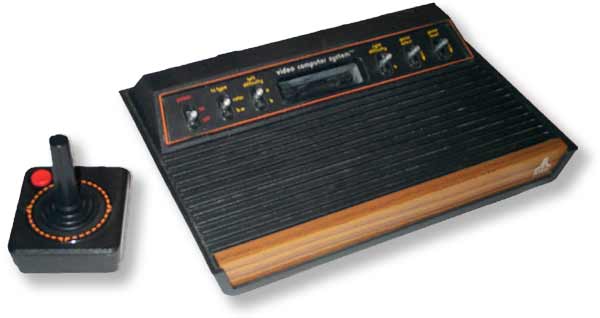
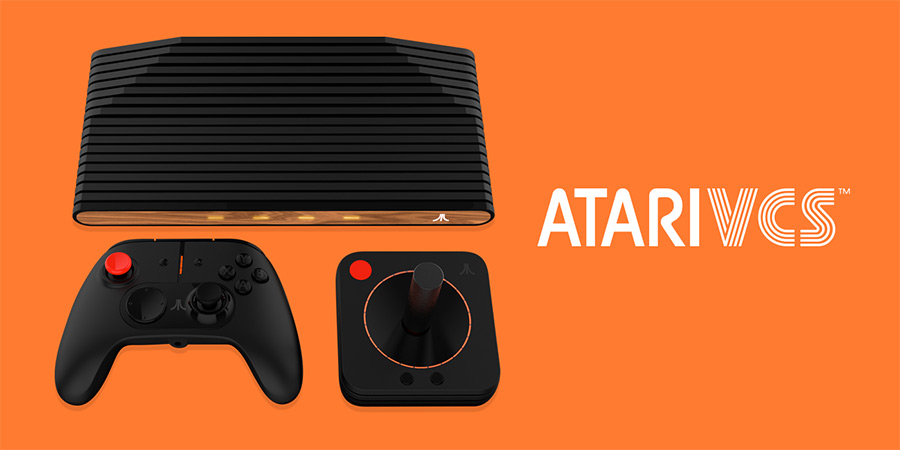
The Atari 2600 games console was originally named the VCS, for “Video Computer System,” when it launched in 1977, and “VCS” is the name given to the neo-2600 that Atari – now probably about the fifth company to have used that name – will launch in 2019, having raised $2 million in its first day of crowdfunding and pre-orders.
The new VCS evocates the ridged black plastic and woodgrain design of the original console, except using real wood this time, while the voice-activated, Linux-based system with ARM processor is expected to play high-end PC games, along with the original 2600’s games, in addition to streaming video services.
In other words, the new VCS is a standard modern computer, but in a box designed to make you feel nostalgic for a forty-year old machine whose abilities were so limited, and so notorious for how it was programmed, it may make those that did program those games want to throw it against a wall.

Put simply, a computer will usually have a “frame buffer,” driving the display, with its own dedicated memory to store each frame before it is sent out. However, computer memory was very expensive in 1977, with the latest new home machines, like the Apple II and Commodore PET, offering only 4 kilobytes (4096 bytes) of RAM – this was also the capacity of the 2600’s game cartridges. In order to reduce the cost of the 2600 as much as possible, only 128 bytes of RAM were made available for all the variables of your game, and no frame buffer was provided at all. Making the most efficient use of the available space will also involve writing each byte in assembly language, using hexadecimal code, to be read directly by the processor.

What are you supposed to do? The answer is you have to tell the machine what to draw on each individual line of the picture you see on your TV screen. This uses only 20 bits (2.5 bytes) of the RAM each time a line is drawn, but you have to keep it going, and time your program correctly, or otherwise your picture falls apart. Furthermore, you can only draw the left-hand side of the screen, with the 2600’s Television Interface Adaptor (TIA) chip enabling you to copy or flip it to the right side. The TIA, also responsible for the sound and reading the instructions given by joysticks and paddles, also provides the two on-screen player sprites, two “missiles,” and one “ball” to make your game – when the most people have played at home is “Pong,” that really is all you needed.


In time, people knew how to exploit the opportunities created by “racing the beam,” attempting to create more detail on screen by timing each line to draw multiples of sprites before the end of each line is reached – this means the bank of alien spaceships required for “Space Invaders” to work became possible, and the release of the most dynamic game yet for the 2600 caused sales of the system to explode. Atari’s own search for producing the best backgammon game that ran “bank switching” between different chips, allowing for bigger, more complicated games, and 1982’s “Pitfall!,” one of the most advanced games for the 2600, was created to make use of a realistic running man that programmer David Crane had made three years earlier.
The Atari 2600 was finally withdrawn from sale in 1992 – as there was no exclusive deals to produce games, and no copy protection in the cartridges, anyone could produce a game for the machine, so nobody stopped. Even now, homebrew programmers continue to see the restricted nature of the 2600 as a challenge, most notably a version of “Halo” written by Ed Fries, who led the team at Microsoft that created the first Xbox console.

This is a very simplified version of how the Atari 2600 works, but when you then look up the story about the debacle over the “E.T. The Extra Terrestrial” game, it becomes clear that the programmer Howard Scott Warshaw needed longer than the five and a half weeks given to him to make something more refined.

03 December 2016

TAKE THAT LOOK OFF YOUR FACE [30]


When I last created a CV, I knew I had to use the correct font. I chose Futura, a precursor to Gill Sans, which is clear and easy to read, especially when any human resources person may scan it for only a few seconds before making a decision. If I chose the wrong font, any split second of confusion in the reader could have threatened my future career prospects.
So, when I come across forms at work that use COMIC SANS, that a company has asked us to fill in, and which could be used in a court of law, you do question the decisions made by both the designer, and by those that said, “yes, that looks OK.” The company concerned does not use these anymore, so they must have realised what the forms look like.
Comic Sans exists to look child-like, but its misuse has made it look childish. Designed for Microsoft Bob, a 1994 program to make navigating screens easier for novice computer users, it was intended to solve the problem of having a cartoon dog having speech bubbles that used Times New Roman, a font designed for use in "The Times" newspaper from 1932 to 1972. However, the font’s designer, Microsoft’s Vincent Connare, did not have the font completed in time for Bob, but it was included with Windows 95.


To me, the main problem with Comic Sans is its deliberate aping of someone’s handwriting, in particular the kind of handwriting you expect your child to grow out of when they are taught how to join the letters up. Therefore, when an adult uses it, you doubt any serious intent in the words you are given, and you are less likely to take in their meaning. Its position as a default font on Microsoft Word makes it too easy a choice, especially when few people are likely to look for a font that fits what they want to say. When the inevitable consequences of this appear, you will eventually read the message, but not after you have rolled your eyes first.
The irksome nature of the font’s name doesn’t help either. Few comic books are made for children these days, and the most popular graphic novels of the last thirty years carry the phrase “Suggested for Mature Readers” on the back cover. “Watchmen” and “Batman: The Dark Knight Returns” are the two books that, when collected into square-bound books, gained the medium the respect that has grown into blockbuster film franchises.

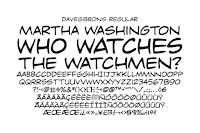
However, “Watchmen” and “Dark Knight” inspired Comic Sans, through the work of Dave Gibbons and John Costanza respectively, and by being found on Vincent Connare’s bookshelf. Gibbons, who drew and lettered every page of “Watchmen,” described Comic Sans as, “…a real mess. I think it's a particularly ugly letter form.” I don’t think the fact you can buy a Dave Gibbons font has anything to do with his opinion, but having your name even mentioned alongside Comic Sans can’t be desirable.
For the record, Vincent Connare went on to design Trebuchet MS in 1996, which is a much easier font to look at.