Showing posts with label Canon. Show all posts

27 September 2026

NAME IT, READ IT, TUNE IT, PRINT IT [554]


I am not saying that you shouldn’t buy the Canon TR4750i combination inkjet printer and scanner, I am just saying that using one is never straightforward.

I needed to print out some tickets, sent to me by e-mail, for a visit to an art gallery, a standard failsafe for me because the last thing you want to do is rely entirely on your phone to hold the key to visiting places – the same has gone for airline boarding passes. 

I bought my first inkjet printer when I was completing my A-Levels – carrying on into my degree, I remember the satisfaction of submitting coursework and essays without the added worry of finding somewhere to print them first.

However, that was a time before wi-fi. Attempting to print the tickets from my phone via Apple’s AirPrint standard did not pick up the printer at first, necessitating my restarting the printer. Once my phone finally connected, the printer just fed the paper through itself without making a mark. 

Two further attempts at printing, with the same outcome, led me to shine a light, literally, on the LCD panel on the printer – it is not backlit, and I have put the front-loading printer on a shelf due to available space, which obscures my view of this display – to be told that the device needs to complete a firmware update before it will do anything else. You would have thought Canon could have sent such a message to the print properties screen on my phone, or even print it on the paper I was trying to use.

I later turned on my desktop computer, reasoning I can better see and control what is going on, which made no difference to what the printer was doing. The QR codes showing on the tickets were not appearing in the preview screen, which led to my finding they were being treated as part of the document’s background, instead of as the main reason for doing any of this. Finally, having changed all the settings I could see, I printed the tickets off, and got on with my life.

Rather than the usual gripe about inkjet printer cartridges being so expensive that buying a new set of black and colour cartridges could set you back as much as the printer initially did, a comparison per millimetre of ink with the price of champagne, mine is with the actual ability to print. I let two months pass from the purchase of the tickets until I could sum up the energy to print them out, knowing it will never do it how I want the first time.

I think I may have also expected too much from it for the money. The printer loads and feeds out its paper from the front, meaning you can place it on the shelf, but more expensive models have its control screen on the front flap too, meaning you will be able to see if it needs a firmware update. I also have my suspicions that its ability to print double-sided leads it to spew out an empty page if processing the request becomes too difficult.

Admittedly, the scanner was my main reason for this printer’s purchase, intending for it to eliminate more sheets of paper than it will ever be expected to print. Somehow, I have had no software problems there so far, so perhaps Canon is encouraging me to reduce my use of paper?
27 February 2022

DON’T KNOW WHAT A SLIDE RULE IS FOR [333]


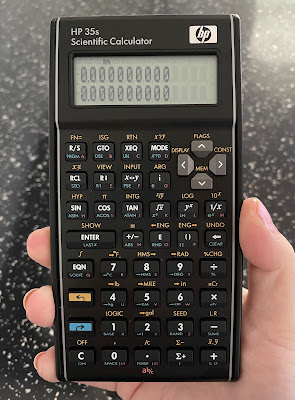
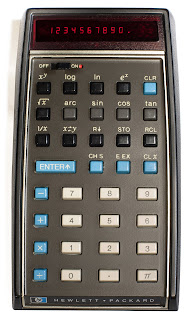
The year 2022 marks fifty years since the introduction of the first pocket scientific calculator, the Hewlett-Packard HP-35. Despite this, I have not seen any evidence that this anniversary is going to be marked in any way, especially as the calculator HP introduced to mark the 35th anniversary in 2007 remains in production to this day, without any changes or updates having been made. The HP 35s could well be the final statement on the matter, as if nothing further can be done.

Having said that, the HP 35s is my favourite calculator to use – I originally said this about the HP-12C financial calculator, in my video about it in 2019 [link], but I hadn’t got my hands on an HP 35s yet. Like the original HP-35, it is ostensibly an engineer’s calculator, including all the expected trigonometric and statistical functions, plus logic and conversions of numerical bases and unit measurements. It is also programmable for any equations you need to need to use frequently, using an intuitive basic language. It is the most you can get a “standard” scientific calculator to do before expecting it to draw a graph and connect to your computer. For me, the HP 35s is solid and dependable, its bowed sides alluding to the original HP design made to fit your pocket more easily, and the keys have a very satisfying click, making it a good stress reliever.


Like the HP-12C, the 35s can use Reverse Polish Notation (RPN) for number entry, which is most easily summarised as entering the number first, then saying what you want to do with it: while you would enter 1 + 2 + 3 = on a standard calculator to get the answer 6, an RPN calculator requires you to type 1 ENTER 2 + 3 +, with no equals button required. More crucially, HP’s RPN calculators use a four-level stack of numbers when calculating, allowing you to combine answers to different calculations more easily using fewer keystrokes – there are also dedicated keys for changing the order of numbers in the stack, depending on what you need. The standard display always shows the first two numbers in the stack, making it much easier to picture everything in order. I found myself becoming so used to this when working from home that I had to buy a second HP 35s for when I returned to the office.


I think this is enough cause for a celebration, but I collect calculators, so of course I would say that. What I think means we may not have this is that HP is not the same company it was in 2007: it had already spun off its analytical instrument arm, including the oscilloscope manufacture on which the company was founded, as Agilent in 1999, and it separated its consumer computer business from its enterprise products and services in 2015. With Hewlett Packard Enterprise also taking the names of the company’s founders with it, the “HP” logo on computers and calculators no longer legally stands for anything, other than the history it used to have. With calculators being HP’s first ever product for the consumer market, it is now listed as “accessories” on the consumer HP’s website, rather than having been hived off with Agilent.


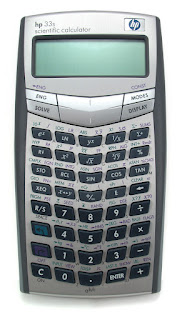
Even then, I am not sure how much involvement HP has with its calculators – their range has been made for them by the Taiwanese company Kinpo Electronics since about 2003, which is also true for Casio and Canon calculators. Up to then, HP’s range had used one standard design, from the cheapest 10B business model to the most advanced 42S scientific calculator, but this was swept aside for an array of bewildering designs for each one: the 35s’s predecessor, the 33s, pushed its keys into a V formation that, to me, is difficult to look at, so a return to the more traditional look based in the 1970s was actually beneficial – another business calculator, the 17bII+ (denoting the second version of an earlier calculator, with more features added), was redesigned to match.


Having heard no announcements or developments so far, it would be a shame not to mark this anniversary in some way. Even if calculator use outside of schools and exams have been replaced by phones and spreadsheets, the initial explosion in their manufacture and use in the 1970s led manufacturers to move to home computers, digital watches and synthesisers. I wouldn’t want this article to be the only acknowledgement of that.

29 August 2021

BUT I DO KNOW ONE AND ONE IS TWO [308]


There seems little point in posing a maths question if the intention is to trip someone up, especially if you create doubt over whether a right answer is possible. 

I had previously seen the following example spread widely in 2019, and it has reappeared many times since: 8 ÷ 2(2x2) = ?


But this one has also appeared: 5 + 6 x 4 = ?


There is one very clear reason why the answer to the first question is 1, but this same reason is why the answer to the second could be either 44 or 29.


BODMAS has been taught in British schools since the 1920s, prescribing how you should solve maths problems: Brackets, Orders, Divide, Multiply, Addition, Subtraction. Known as PEDMAS in the United States because of the alternative use of parentheses and exponents as mathematical terms, these abbreviations were created in the hope of becoming acronyms ingrained in the heads of schoolchildren – I think they eventually got there.


When I originally saw 8 ÷ 2(2x2), I knew the answer could only be 1, because brackets were used: 8 ÷ 2(2x2) = 8 ÷ 2(4) = 8 ÷ 8 = 1.


However, 5 + 6 x 4 could be answered linearly or using BODMAS, creating two different answers:


Linear: 5 + 6 x 4 = 11 x 4 = 44


BODMAS: 5 + 6 x 4 = 5 + 24 = 29


This is usually the end of it, but I realised it was never really explained at school why this rule even exists, and it is down to how much each mathematical operator changes the eventual answer. Multiplication and division are simply adding or subtracting one number many times, so it would make sense to act upon those first, but you should always simplify by answering brackets first – writing 5 + 6 x 4 as 5 + (6 x 4) also makes clearer what is meant to be happening. 


Left to right: Casio SL-310UC, Canon LC-83M, HP 35s


However, while BODMAS confirms that multiplication should be done before addition, dividing does not need to be done before multiplying, or subtraction before addition, so trying to create an acronym creates a misnomer as well. Calculators that implement BODMAS are programmed to multiply or divide, whichever comes first in the equation, followed by adding or subtracting, again whichever comes first.


But you can even get a different answer based on the calculator you use. I tried this with a Casio SL-310UC, a basic calculator, and the answer produced was 44, because it calculated each segment of the question as you go: pressing the multiply button after entering 6 produced the answer “11” on screen, before entering 4 and pressing the equals button. 


Meanwhile, the Canon LC-83M, a 1980s slide rule calculator, only produces an answer when you press the equals button, down to the “Algebraic Operating System” displayed on the case. BODMAS is built into the calculator, guaranteeing the answer of 29 in this case.


To make things extra complicated, the HP 35s, a sophisticated programming scientific calculator, can produce both answers. In Reverse Polish Notation, you enter your numbers first, then enter what you want to do with them, building numbers in a stack – this relies upon the user to remember BODMAS to multiply the 6 and 4 first, instead of starting with the 5 and adding the 6. Changing the HP 35s to the standard Algebraic function used by the other two calculators, BODMAS now automatically applies, producing the answer 29.


With calculators now mostly bought for use in schools, adherence to BODMAS is expected, along with the ability to enter equations exactly as they appear on the page. Knowing what you are entering is more important than knowing how the calculator processes it – most instruction manuals therefore add a disclaimer confirming the manufacturer does not take responsibility for any answer generated.